

Flight simulator — what does a flight look like step by step? A complete guide for beginners
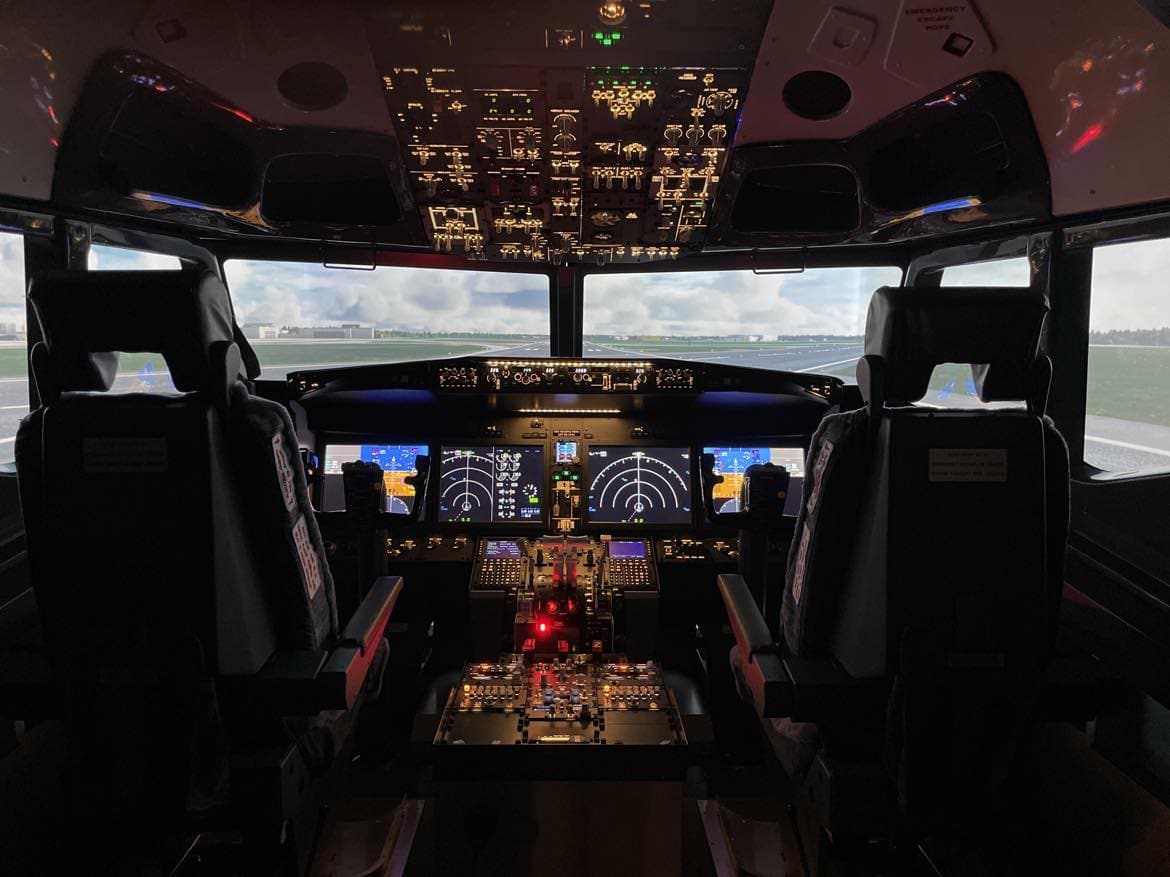
A flight in a professional simulator is one of the most realistic experiences you can have without taking to the air. For many people it is the fulfilment of a dream, for others — the first step towards a pilot's career. If you are wondering, what a flight in a simulator is like step by step, this article will guide you through the entire process — from entering the cockpit to landing.
What actually is a professional flight simulator?
A flight simulator is an advanced device that replicates:
- real aeroplane cockpit,
- the behaviour of the machine in the air,
- aviation procedures,
- weather conditions,
- reactions to pilot errors.
AirPoint uses class-level simulators fixed-base, which:
- they have a full Boeing 737 or Airbus A320 cockpit,
- map all buttons, screens and systems,
- allow for a realistic take-off, flight and landing,
- allow the selection of the airport, weather and scenario.
This is not a game. This real flying, but without the risk.
What does a flight in a simulator look like step by step?
(for example, a session from the Be a Pro category)
Below you will find the complete course of the session — exactly as it appears in AirPoint.
1. Welcome and short briefing
Upon arrival at AirPoint and a smooth check-in at reception, the instructor greets you and asks for:
- Your experience (even if it is zero),
- aircraft preferences,
- the airport you want to fly to,
- difficulty level.
This is the moment you can say:
- „I want to start from Warsaw and land in Krakow”
- „I want to try landing in Dubai”
- „I want to see how the autopilot works”
The instructor tailors the scenario to your expectations.
2. Setting the flight scenario
At this stage you choose:
- departure airport (e.g. Warsaw, Innsbruck, Hong Kong),
- destination airport (or just the landing),
- time of day,
- weather conditions (cloudless, storm, fog, turbulence),
- difficulty level.
It is up to you whether you want to:
- peaceful flight,
- challenge,
- extreme conditions.
3. Cockpit entrance — first impression
That is the moment that makes the biggest impression.
You enter a cabin that looks identical to a real Boeing 737 or Airbus A320:
- hundreds of switches,
- PFD, ND, FMC screens,
- throttles,
- yoke or sidestick,
- overhead panel,
- realistic pilot seats.
The instructor explains:
- where are the most important elements located,
- what will you support,
- what you don't need to touch (at first — most of it).
You don't need to know any procedures — the instructor guides you step by step.
4. Checklists and pre-flight preparation
In real aviation, everything is done according to procedures. In the simulator, too.
The instructor walks you through the simplified checklists:
- Before Starting
- Taxi
- Before Takeoff
You will find out:
- how to set the flaps,
- how to set the autopilot,
- How does throttle work?,
- how to keep an aeroplane on the runway.
That's the moment you start feeling like a real pilot.
5. Taxiing to the runway
This is the stage that surprises beginners the most.
Aeroplane the steering wheel doesn't turn. Ground control uses:
- tiller,
- nose wheel steering,
- or rudder pedals.
The instructor helps you keep the aircraft on the taxiway.
6. Start — the most thrilling moment
The instructor says:
„Set full power. Keep the aircraft in the centre of the runway. At 140 knots, gently pull back on the control column.”
And that's when the magic happens.
The plane accelerates, the vibrations increase, and you:
- you keep the aircraft on the runway centreline,
- you control the speed,
- you are performing a rotation,
- you are rising into the air.
This is the moment when most people say:
„Wow, it's just like the real thing!”
7. Climbing and entering the hold
After takeoff:
- you retract the landing gear,
- you're hiding flaps,
- you are stabilising an aircraft,
- you set the autopilot (optional).
The instructor explains:
- how does autopilot work,
- how to set the heading (HDG),
- how to set the altitude (ALT),
- how to set the speed (IAS/MACH).
You're good to go:
- manually,
- semi-automatically,
- completely on autopilot.
8. Flight at cruising level
This is the calmest part of the flight.
You can:
- take in the sights,
- change the weather,
- change airports,
- learn to play instruments,
- ask questions.
The instructor is showing:
- how navigation works,
- how to read instruments,
- how pilots plan a flight.
This is a great time to learn.
Approach to land
This is the hardest part of the flight — but also the most rewarding.
The instructor is guiding you through:
- ILS setting,
- flap configuration,
- approach speeds,
- checklists,
- maintaining the glide path.
You may land:
- manually,
- with the help of the autopilot,
- in difficult conditions (fog, wind, turbulence).
10. Landing — the moment of truth
You see the runway. You are holding the control column. The instructor says:
„Power idle… flare… hold it… touchdown!”
The aircraft touches down on the runway. You engage the thrust reversers. You brake.
And then comes that feeling:
„I did it!”
11. Taxiing and termination of the flight
After landing:
- you're hiding flaps,
- you're turning off the reversers,
- you are taxiing to the stand,
- you are carrying out the „after landing” checklist.
Instructor discusses:
- what did you do well,
- what can be improved,
- what scenarios you can try next time.
Why is a flight in a simulator so realistic?
Because it maps:
- flight physics,
- procedures,
- instruments,
- aircraft behaviour,
- error handling.
That is why pilots train on simulators before they will board a real aeroplane.
Is flying in a simulator difficult?
No — if you have an instructor.
Yes — if you are trying on your own.
That is why at AirPoint:
- the instructor guides you step by step,
- adjusting the difficulty level,
- It explains everything simply.
Who is the flight simulator for?
- for aviation fans,
- for people who want to try flying,
- for flight school candidates,
- for people with a fear of flying,
- for children and young people,
- for couples and groups of friends.
Summary — what is a flight in a simulator like?
In short:
- Briefing
- Setting the scenario
- Cockpit entrance
- Checklists
- Taxiing
- Start
- Ascent
- Lot
- Approach
- Landing
- Flight debrief
This is the full pilot experience — without the risk, but with the full dose of excitement.
Ready for your first flight?
If you want to experience your first flight in a realistic cockpit, choose a scenario and book a slot at AirPoint.
This is the best way to feel like a pilot — even if you've never sat at the controls before.