

What is an FMC and how does it work? A guide for student pilots and aviation fans
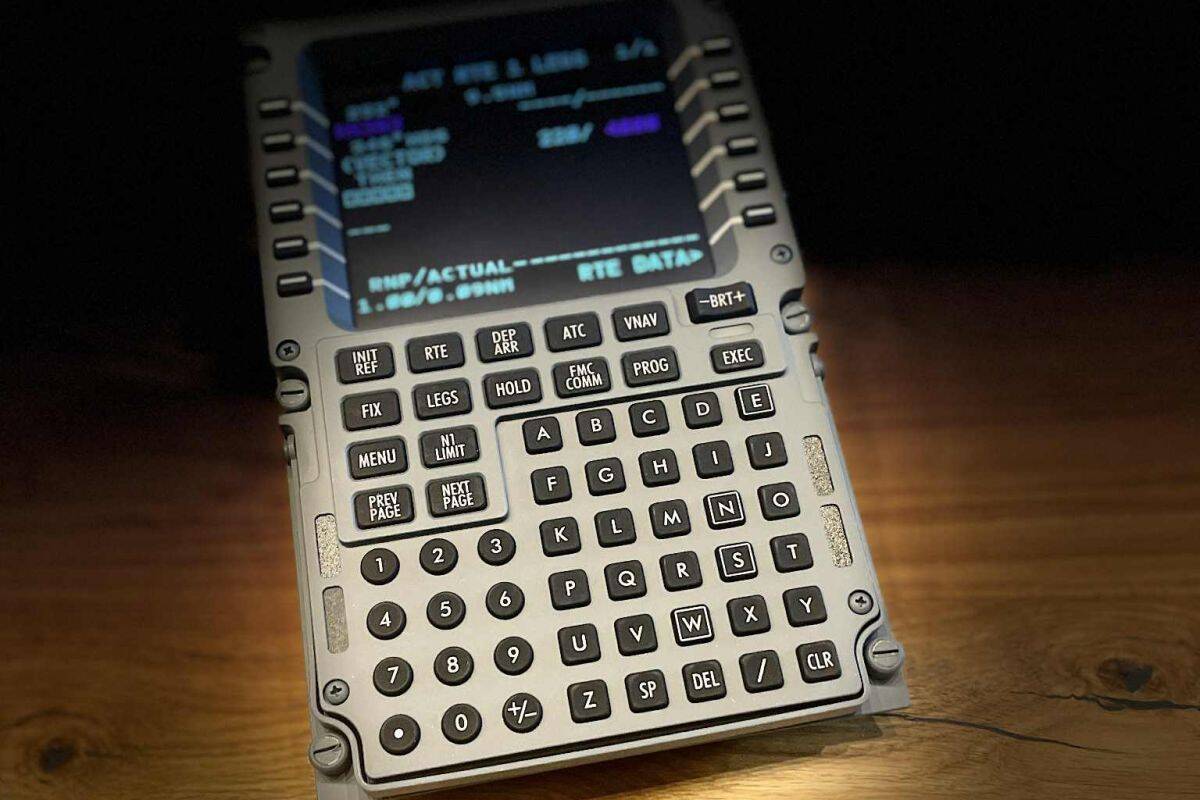
If we were to point to one system that truly „flies” a modern aircraft, it would be this one FMC. That's the brain. The command centre. A navigational computer that knows where to fly, how to fly and when to fly.
A pilot? The pilot tells the FMC, What to do — and FMC does it with surgical precision.
What does FMC stand for?
FMC = Flight Management Computer, meaning the flight management computer.
This is not a single screen. It is an entire system that:
- I'm planning a route,
- flies an aircraft along waypoints,
- it controls speed,
- controls the height,
- works with autopilot,
- optimises fuel consumption,
- He follows the procedures from takeoff to landing.
In short: FMC to GPS, autopilot and flight planner in one.
Where is the FMC located?
In the cockpit you will see two or three identical panels with a keyboard and screen. This CDU Control Display Unit.
CDU is „keyboard and monitor”. FMC is „computer inside”.
The pilot enters data into the CDU, and the FMC processes it.
Does the co-pilot type into the FMC?
It depends on the flight phase, but the most important data are:
Route
- departure airport,
- arrival airport,
- waypoints,
- airways.
2. Aircraft Performance (Perf Init)
- table,
- fuel,
- balance,
- take-off speeds (V1, VR, V2).
3. Procedures (SID/STAR)
- departure procedure,
- approach procedure.
4. Speeds and Altitudes (VNAV)
- cruising altitudes,
- restrictions,
- rates of climb and descent.
5. Approach
- ILS,
- minima,
- glideslope.
All this creates a complete flight plan.
How does the FMC fly the aeroplane?
FMC works with the autopilot:
- LNAV — flies an aircraft along a horizontal route (heading).
- VNAV - flies the aircraft along a vertical profile (altitude, speed).
The pilot sets LNAV/VNAV, and the FMC:
- turns for points,
- is rising,
- lowers,
- maintains speed,
- I obey the speed limits.
This is a textbook flight.
Can the FMC make a mistake?
Yes — but usually through no fault of their own.
The most common errors stem from:
- of the incorrectly entered route,
- mistakes in the points,
- incorrect heights,
- out-of-date database,
- of the incorrect SID/STAR procedure.
That's why pilots always checking the route on maps before takeoff.
The most important FMC pages for beginners
1. INIT / POS INIT
Setting the aircraft position.
2. ROUTE
Flight route — points, airways, airports.
3. PERF INIT
Mass, fuel and speed data.
4. TAKEOFF REF
Take-off speeds, flaps, power.
5. CLB / CRZ / DES
Climb, cruise, descent.
6. APPROACH
Approach and landing data.
This is the „backbone” of every flight.
FMC in the simulator – why is it worth getting to know?
Because it gives:
- complete realism,
- control over the route,
- understanding autopilot,
- the ability to fly like a real pilot,
- immense satisfaction.
In the simulator you can:
- plan a route,
- set up SID/STAR,
- execute LNAV/VNAV,
- fly an ILS approach,
- take the controls at any time.
This is a proper flight school — stress-free and risk-free.
Summary — what is FMC and how does it work?
FMC to:
- flight management computer,
- navigation centre,
- route planner,
- Autopilot partner,
- pilot's tool.
The pilot tells the FMC, What to do. The FMC tells the autopilot, how to do it. Autopilot is executing the task.
The perfect three.
Do you want to learn FMC/FMS from scratch?
Do you want to learn the FMC/FMS from scratch and conduct a full flight like a real pilot?
Book a place for a training session or in the AirPoint simulator and go through the entire process — from the flight plan to landing.